
One system that runs your whole school.
LiveClass runs your school end to end — enrolment, fees, lessons, attendance, and one portal parents actually use. Online on Zoom, or in person in a room.
Your data stays in the EU
Our own servers in Germany — not a US cloud account, and not a patchwork of third-party apps each holding a piece of your school.
Every screenshot here is real
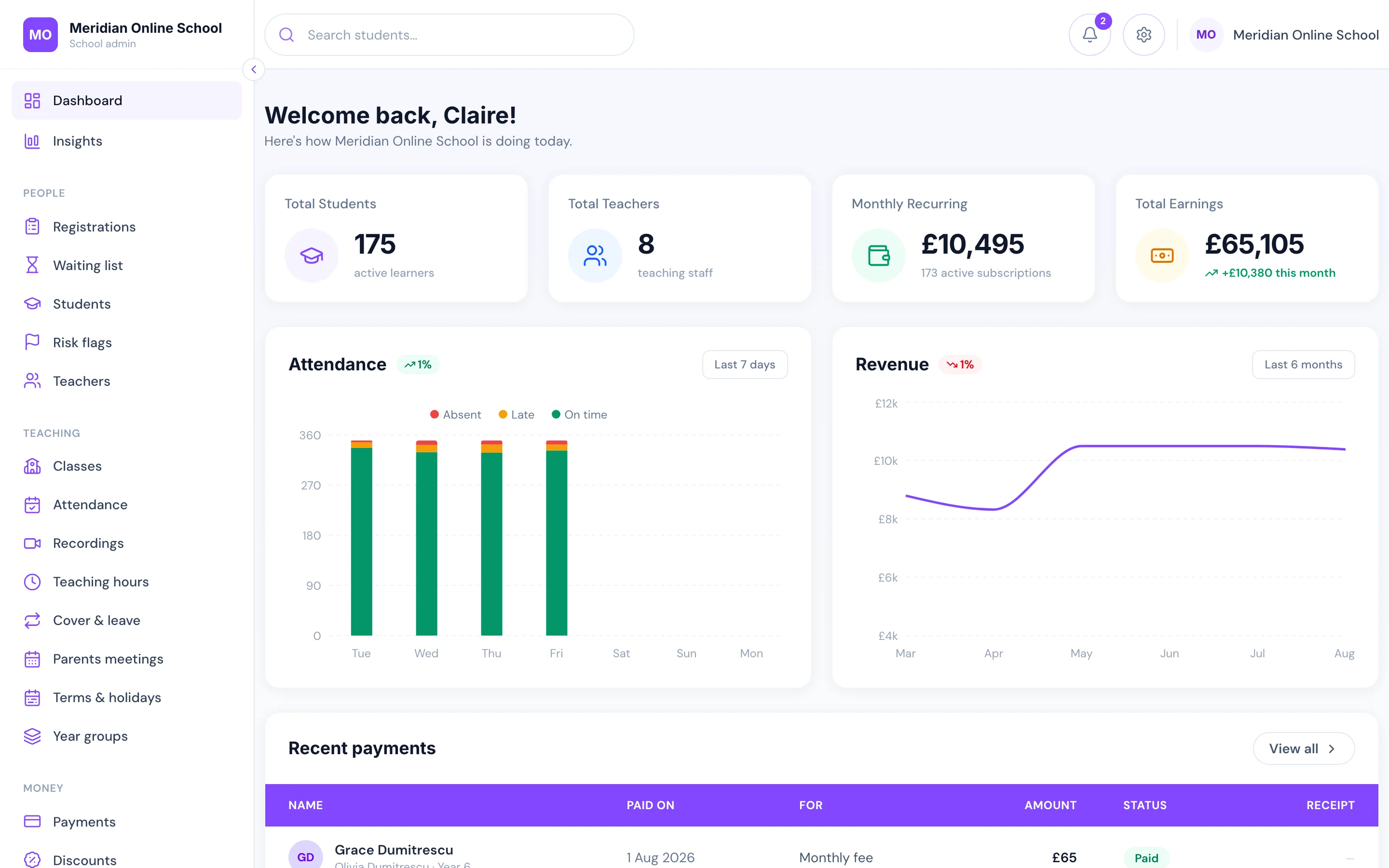
Each screenshot on this page is photographed from the running product, not drawn in Figma. What you see is what you would be given. The single exception is the phone lock screen, which is drawn and captioned as such — notifications are painted by the phone, so there is nothing in the app to photograph.
We move you across
Pupils, families, classes and fee arrangements are migrated and checked by us, and your staff are trained before you go live.
One fee for the school
Quoted for your school after a demo. Nothing per parent, per teacher or per login, and you keep 100% of the fees you collect.
The problem: a different tool for every job, and none of them talk to each other
A school that has grown past a hundred pupils is usually being held together by software that was never meant to run a school. Every school’s combination is a little different; the shape of the problem is not. Each tool works. The gaps between them are where the day goes.
Website builder
Public site
Nobody can edit it without ringing the agency
Form tool
Registration & waiting list
Answers live outside your records — retyped by hand
Stripe
Fees
Never automatically matched to a child or a class
Zoom
Live lessons
Links pasted into chats; attendance reconstructed afterwards
Homework app
Work & feedback
A subscription, a separate login, your data on their servers
Noticeboard app
Class announcements
Another subscription, another login, another silo
Group chat
Parent comms
System of record for nothing, black hole for everything
Spreadsheets
Running the school
Duplicate pupils, broken formulas, "Copy of" tabs
The office becomes a help desk
The same five questions, asked by different parents, dozens of times a week — because the answers are not anywhere a parent can look.
Every new pupil adds work
Nothing gets more efficient with size. Fifty more children means a bigger spreadsheet, more payments to chase, more messages to answer.
Families leave quietly
Not over teaching. Over feeling under-informed and dealing with a school that seems disorganised — and you find out at deregistration.
Built for online and in-person schools
Whether your lessons are live on Zoom or taught in a room, the operational problem is the same, whatever you teach.
Online primary & secondary schools
A full timetable taught live, with families who expect the same visibility a physical school gives them.
Weekend & supplementary schools
Hundreds of pupils, a handful of hours a week, and an admin load that behaves as if it were full-time.
Language academies
Ability-grouped classes, rolling intakes and teachers spread across time zones.
Tutoring companies
Many small groups, many tutors, and fee collection that has to be effortless or it does not happen.
Faith & community schools
A distinct curriculum alongside the core one — configured, not compromised.
In-person centres & clubs
Language, skills and community classes taught in a room — enrolment, fees and a tablet register in one place.
One system, from first enquiry to final invoice
Every screen below is the real product.
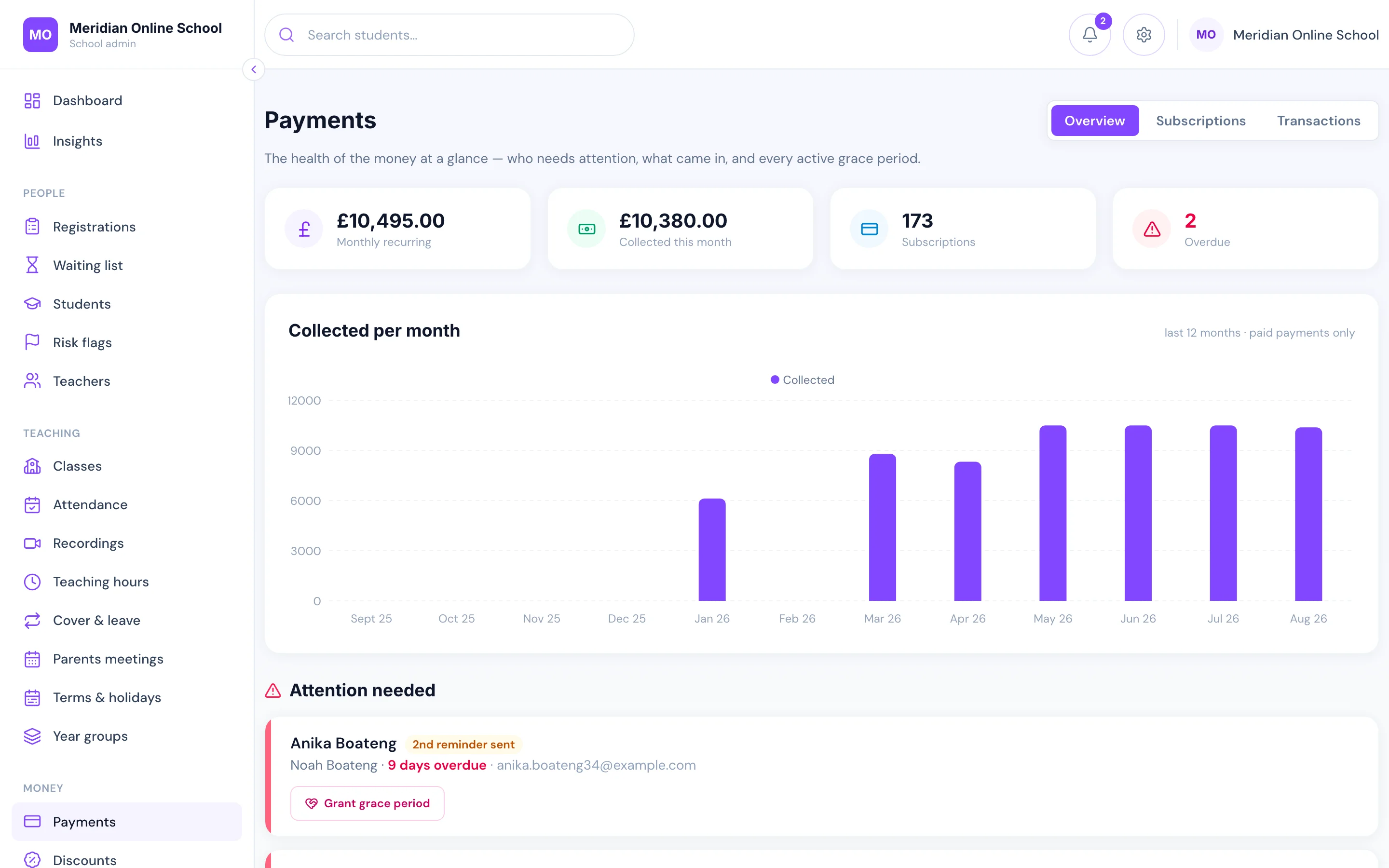
Fees that invoice, chase and reconcile themselves
Most schools still do this by hand: raise the invoice, send the payment link, tick a spreadsheet, remember who has not paid, chase them, then work out which children to let into class. It is the single biggest use of an office’s week, and it grows with every pupil you enrol.
Here none of it is a job. A parent applies and pays by card in one go and lands in the right year group. From then on every monthly invoice is raised and charged automatically against their saved card, with sibling, staff and scholarship discounts applied by rule rather than recalculated by hand.
When a payment fails, the follow-up runs itself on a schedule you set — a reminder with a pay-now link, a second reminder, a final warning, and an alert to your office — and it stops the instant they pay.
- Invoices raised and cards charged automatically, every month
- Overdue chasing runs itself: reminders, pay links, final warning
- Paid at 11pm? Class access is back at 11pm — nobody has to be awake
- Siblings pause and unpause together, because they share the card
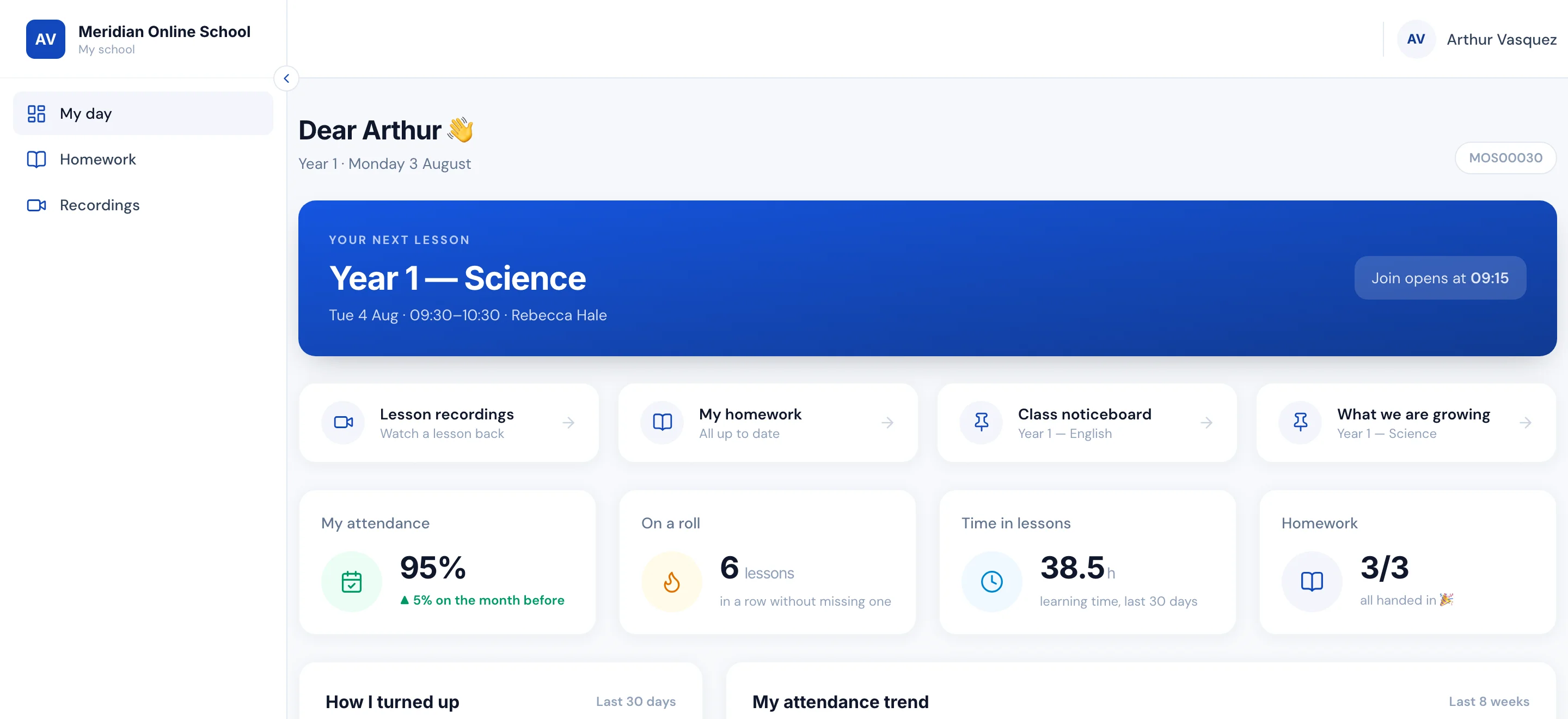
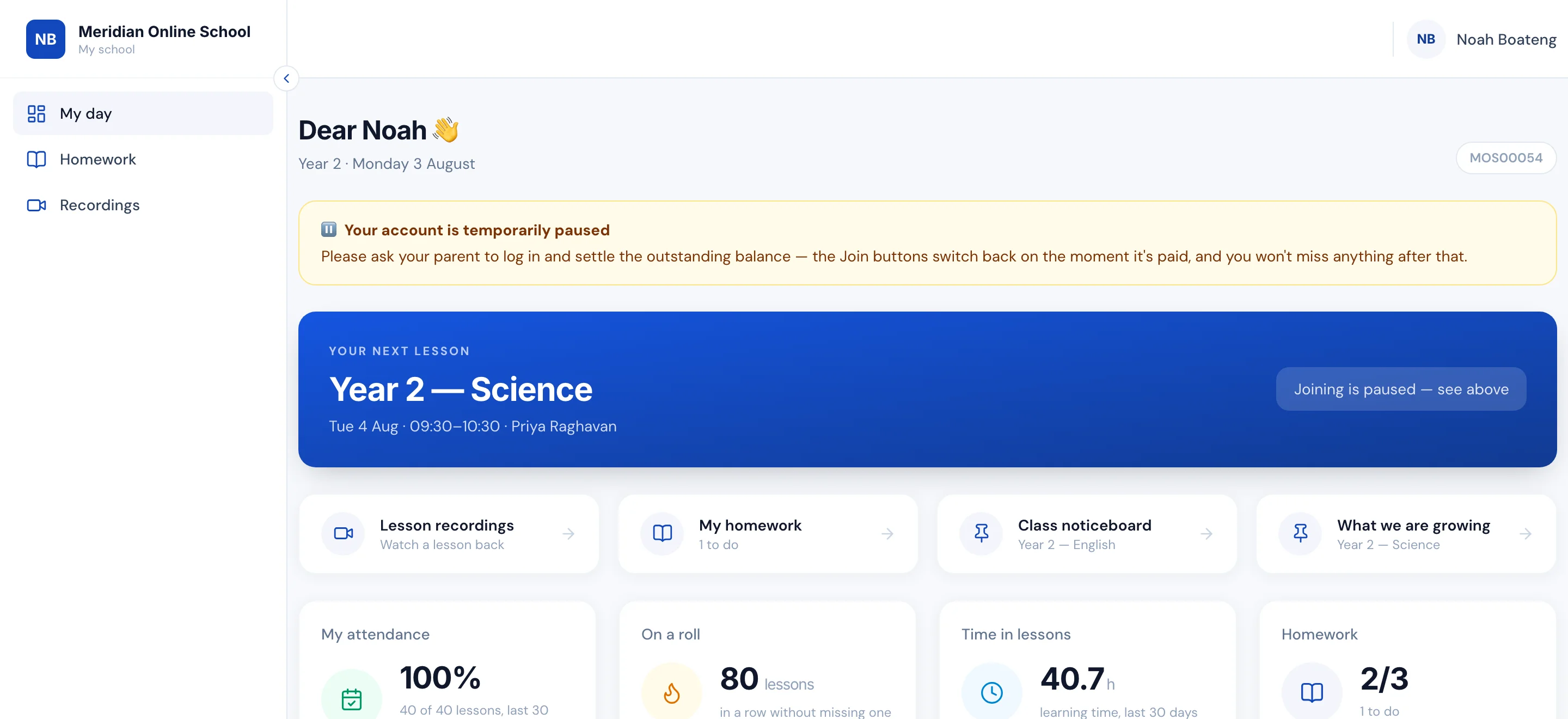
Nobody sends out a Zoom link, ever again
Making the meetings, posting the links, re-posting them for the parent who missed the message, then working out who on the call was meant to be there. And one link shared with everyone, so anyone who has ever had it can walk into any lesson.
Here the meeting is created with the class, and every child gets their own private link. They open their portal, see their next lesson, and the button switches itself on a few minutes before the start — you set how many. Because the link is theirs alone, siblings on one laptop count as two people, and a Year 1 link cannot open a Year 5 lesson. The window is enforced on our side, not greyed out in the app: yesterday’s link does not work, and neither does arriving an hour early. When a teacher is off, cover moves the room — the pupils’ links do not change.
The same button enforces the fee, if you switch that on. A family far enough past due is turned away with an explanation rather than a broken link — your account is paused, ask your parent to settle it — and the moment the payment clears, the very next click works. Nothing to re-enable, nobody to email at eleven at night.
- A private join link per pupil, created the moment they are enrolled
- The button opens a few minutes before the lesson — you set how many
- Enforced server-side: an old or shared link simply does not open
- Unpaid fees close the door politely; payment reopens it in seconds
Attendance records that take themselves — for pupils and teachers
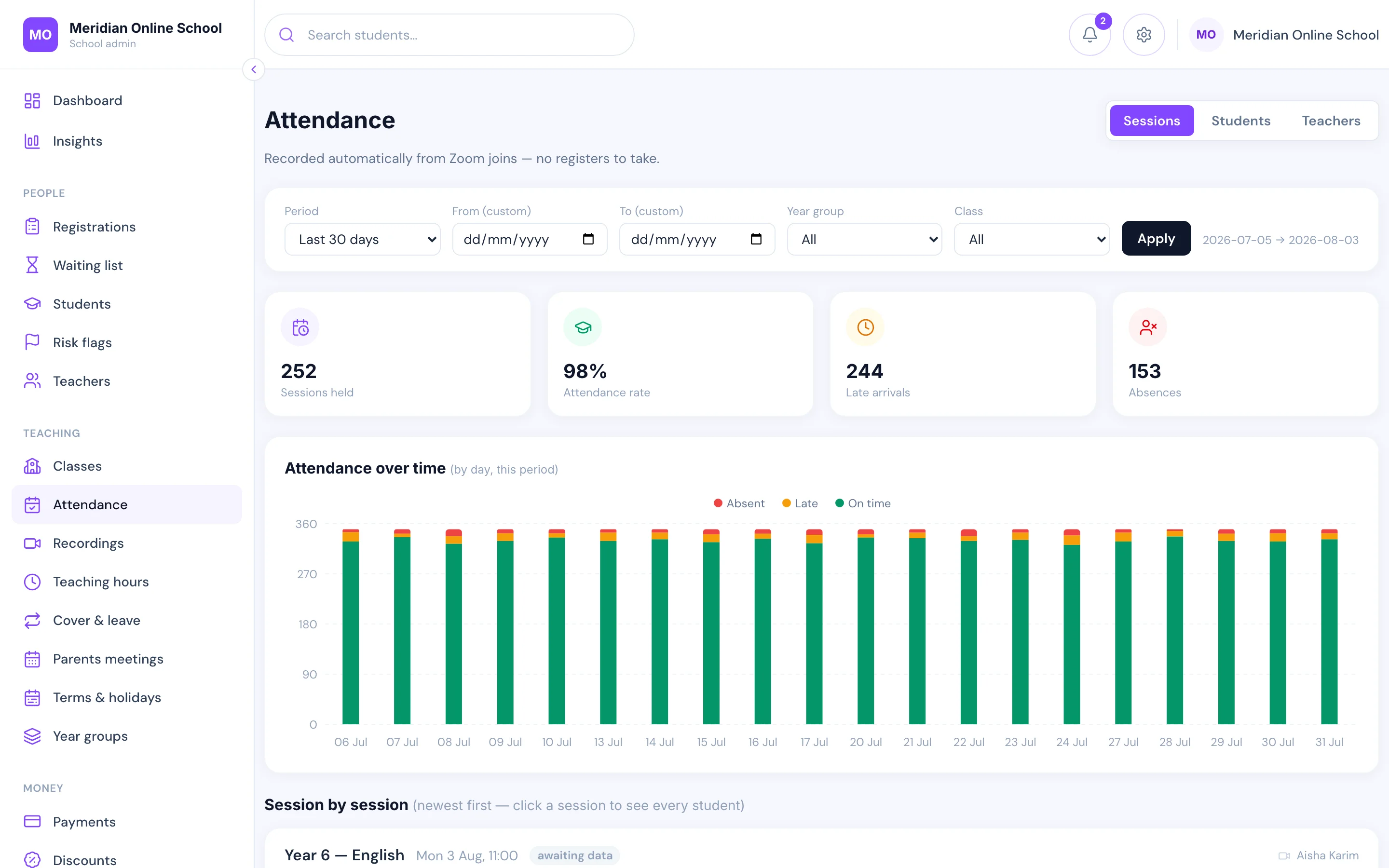
What if nobody at your school ever took a register again, because every live class did it for you? Today it is a teacher reading names aloud and typing them into a spreadsheet afterwards, if they remember. Missed registers are invisible, so the rate you report is only ever roughly true — and the child who is quietly slipping surfaces at the end of term, too late to act.
Here joining the lesson is the register. Zoom reports how many minutes each child was actually in the room, so one who appears for four minutes of an hour is not recorded like one who stayed for all of it. Absence then acts on its own: parents get an email the next morning naming the lessons their child missed, and the school gets a Monday summary — rates by year group, the pupils falling behind, and any class a teacher did not turn up to.
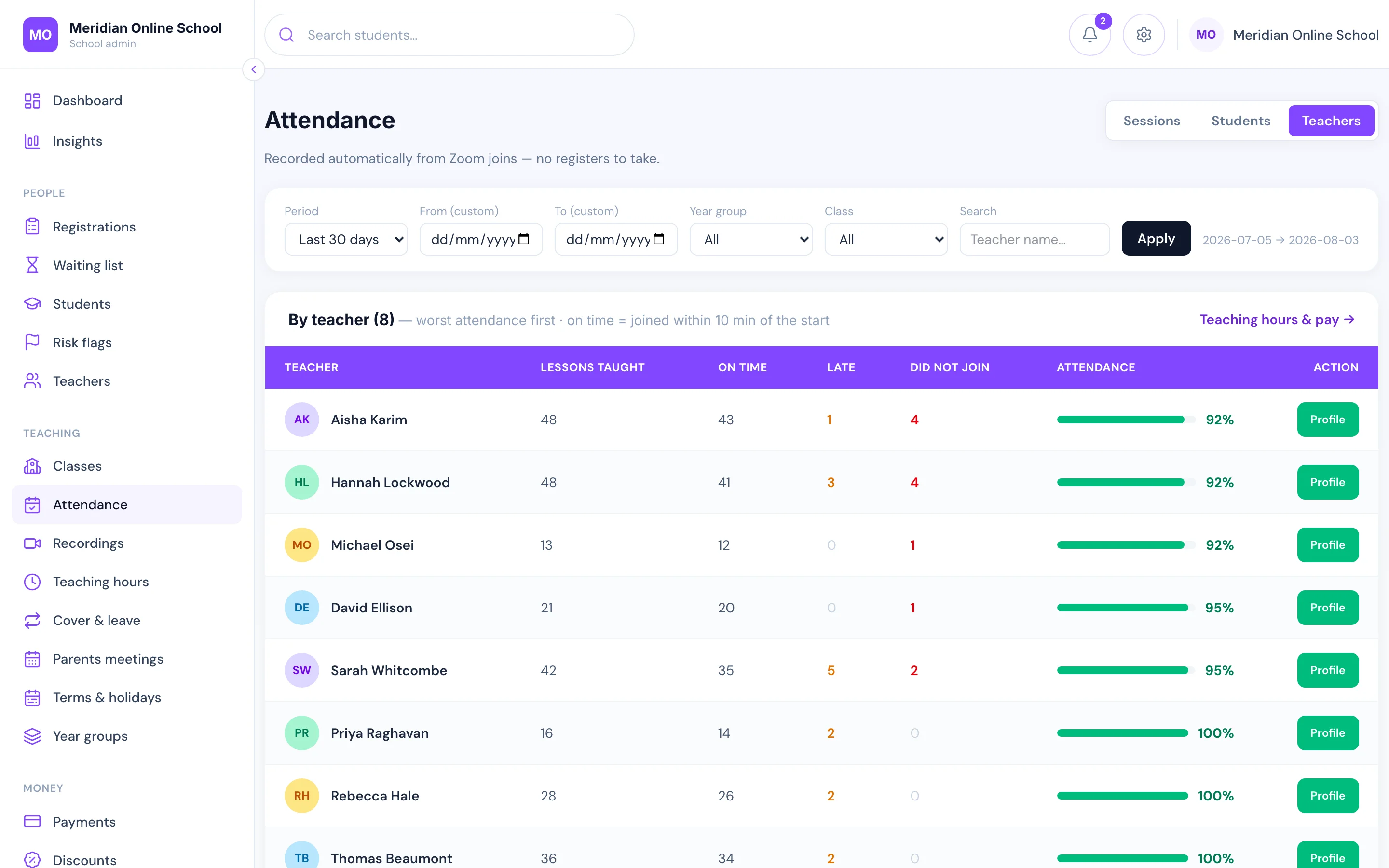
Your staff are measured the same way, from the same source: lessons taught, joined on time, joined late, did not join — taken from the meeting rather than self-reported. A late join automatically reduces the paid time on the hours report, so the pay run reflects what actually happened.
If your lessons happen in a room instead, the same records fill from a tablet register: the teacher marks the class in a few taps — mark all present, then fix the exceptions — and the office can mark it too. The absence emails and the Monday summary are identical; only where the marks come from changes.
- Minutes actually attended, per child, straight from Zoom
- Parents emailed the next morning about a missed lesson
- Monday summary to the school: rates, worst attenders, teacher no-shows
- Teacher punctuality measured the same way — and it feeds the pay run
Set, handed in and marked — without another app to log into
Most schools run this on borrowed tools: a Padlet board for one class, Seesaw or ClassKick for another, homework photographed and emailed, feedback typed somewhere else again. Each one is another login for a nine-year-old, another place a parent has to check, and another set of children’s work sitting on a service the school does not control.
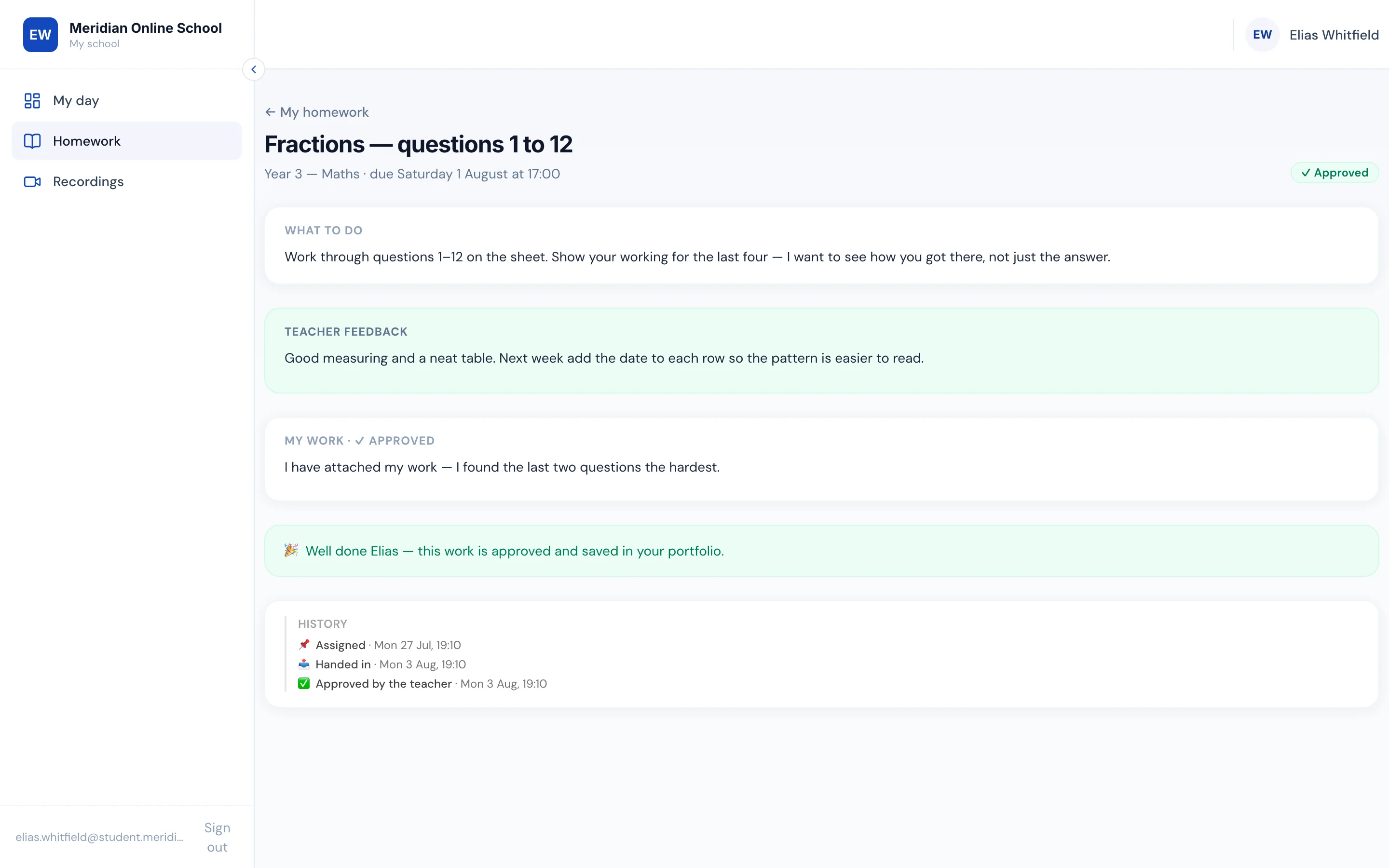
Here it is one place, behind the same login as their lessons. A teacher sets the task against a class with instructions and a due date. Pupils hand in from their own portal — typed, as a photo or PDF of what they did on paper, or as a recorded answer when writing is the obstacle rather than the thinking.
Set a worksheet instead and the teacher’s pages become the workspace: the child writes straight onto the page, and the teacher marks on a layer over the top, the way they would with a red pen — no printing, no scanning, nothing to hand back.
Marking happens on the same screen: written feedback, then approved or sent back for another go, with every step kept — assigned, handed in, marked. Approved work is saved to the child’s portfolio, and parents see all of it in their own portal without anyone having to send it to them.
- Hand in typed, as a photo or PDF, or as a recorded answer
- Worksheets pupils write on and teachers mark over, in the browser
- Approve or ask for another go — the whole history is kept
- Class boards instead of Padlet, with pupils’ posts held for the teacher
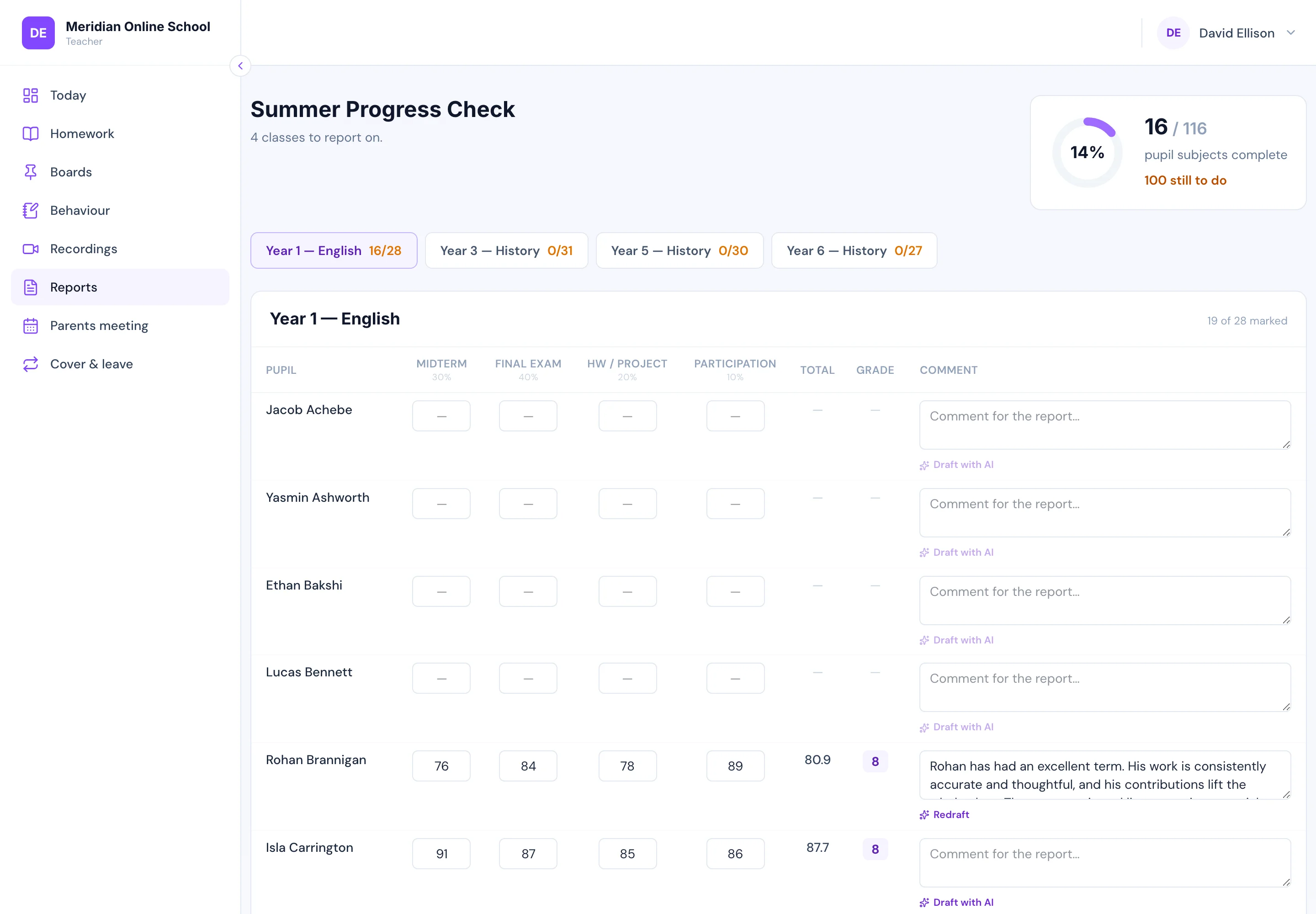
Term reports without the spreadsheet fortnight
Report season in most schools is a fortnight of spreadsheets: one per teacher, formulas that disagree, a mail merge into Word, and a hundred PDFs emailed out one family at a time — then a parent replies asking why the grade changed after it was sent.
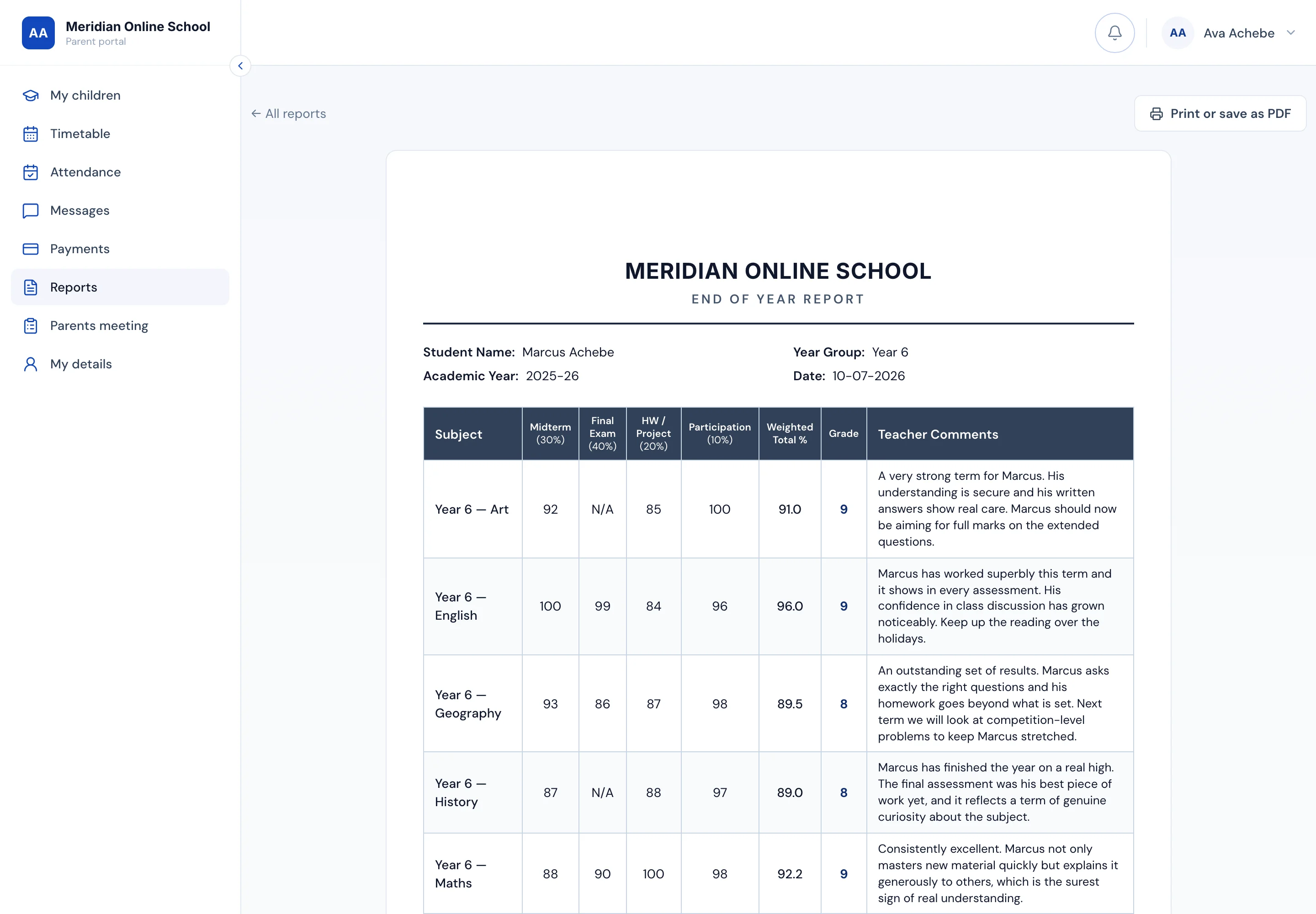
Here the office opens a report round and every teacher gets a markbook grid for their classes: pupils down, your assessment components across, every cell autosaving as they type. The comment can be drafted by AI from that pupil’s actual term — their marks, attendance and homework in that class — and the teacher edits and approves it; the grade itself is never AI, it is arithmetic from weights you set. A pupil who never sat one assessment is handled properly too: the missing component is dropped and the rest reweighted, instead of a zero failing a child for a paper they never sat.
Publishing is refused while any subject is blank, because a report with holes is worse than a late one. Once published, the report is snapshot forever — renaming a class or changing the weights next year can never rewrite a document a family already has. Parents find it in their portal, one email per family announces it, and the copy prints or saves to PDF from the browser.
- A markbook grid per class — marks autosave, totals and grades compute live
- AI drafts each comment from the pupil’s real term; the teacher approves it
- Your components, weights and grade bands — not a scheme we impose
- A missed assessment reweights the rest — never a zero for a paper never sat
- Published reports are snapshot forever, and blanks refuse to publish
- One email per family, and a copy that saves to PDF from the browser
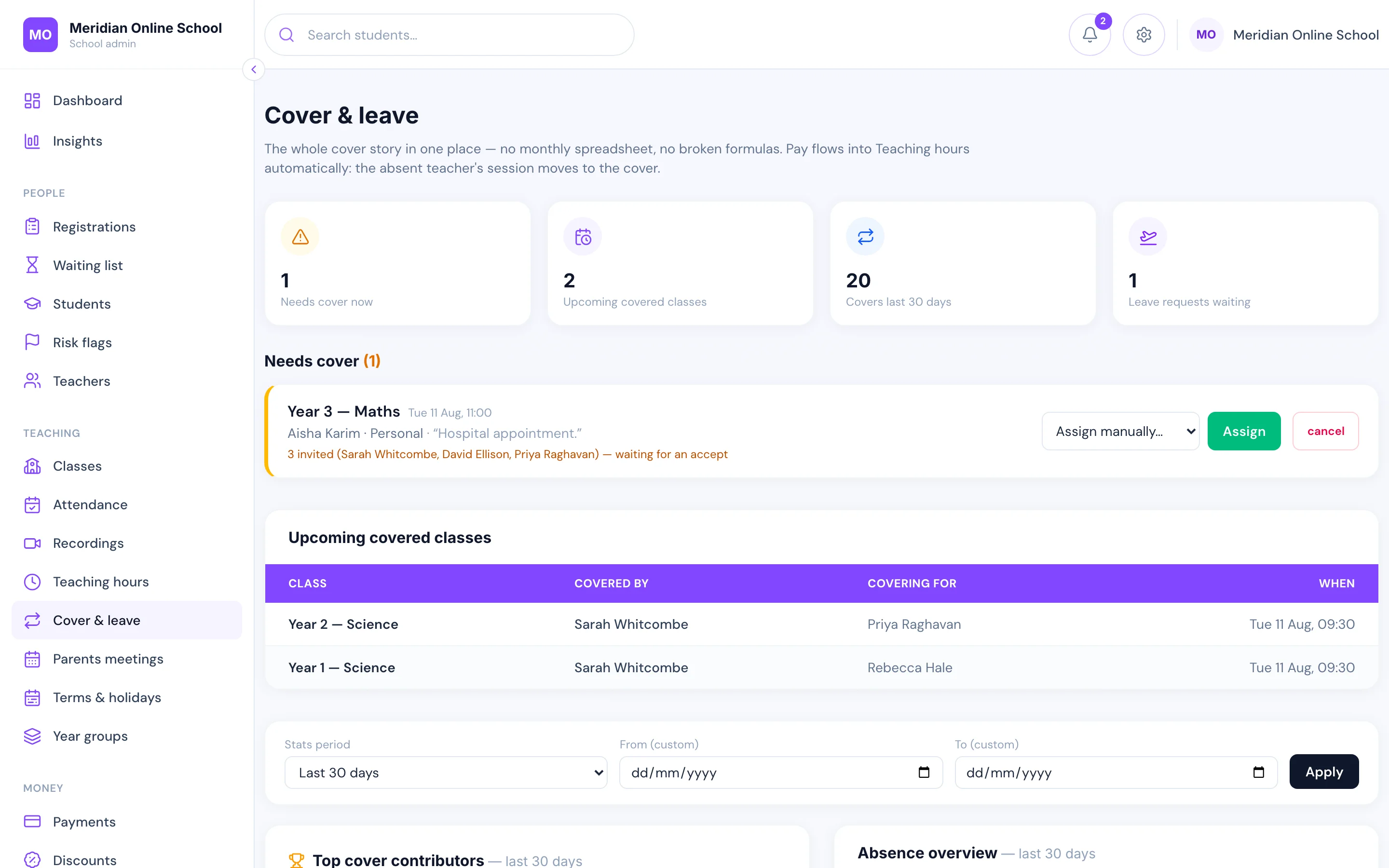
Teacher cover sorted before the lesson starts
A teacher reports absence. Eligible colleagues — right subject, free at that hour, under their monthly cap — are invited automatically. First to accept takes the class and the meeting host moves across with them.
Every cover is logged against the month, so the pay run is a report rather than an archaeology project.
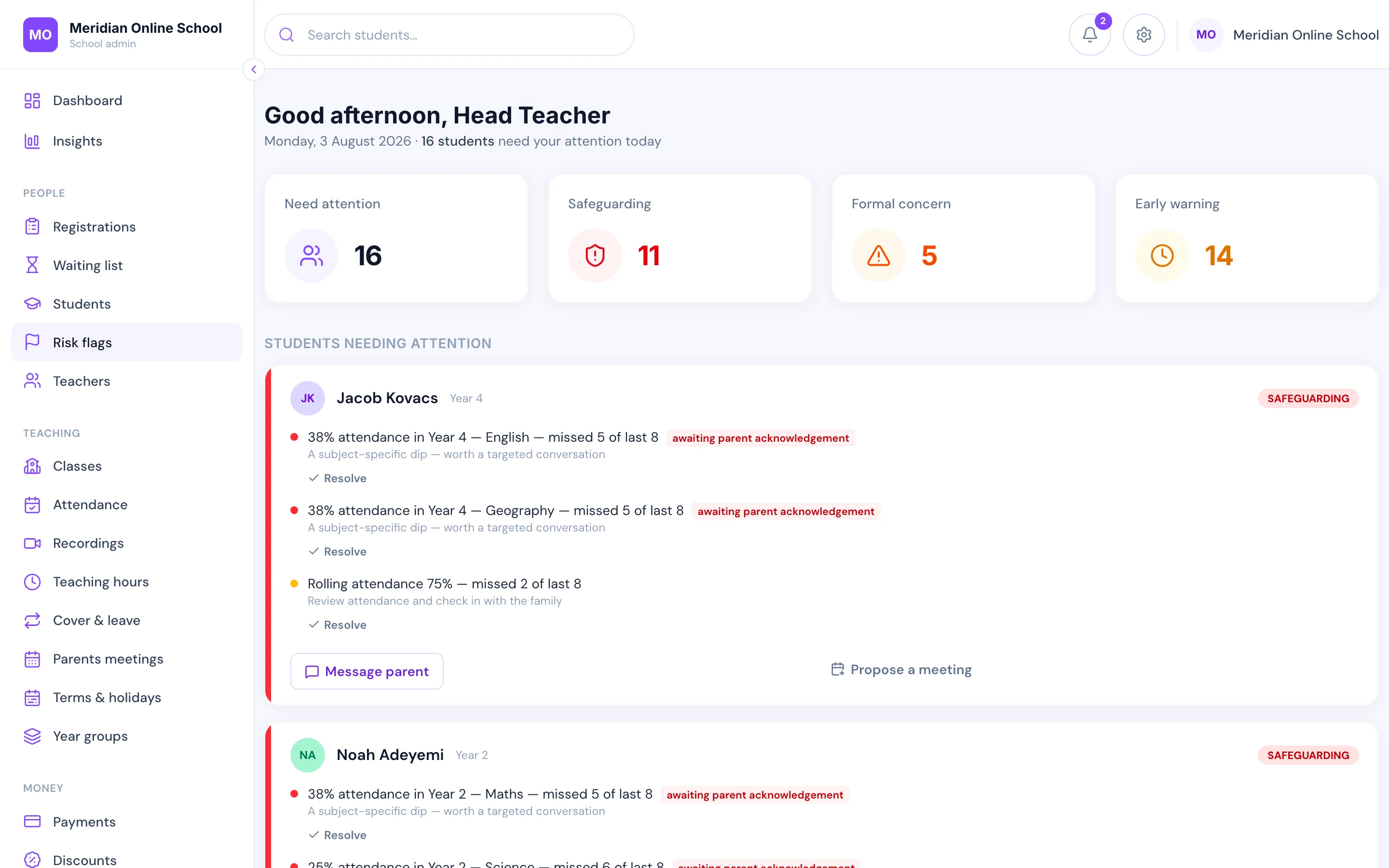
The children who need you, before the term ends
Attendance, payment history, homework and messages are read together and surfaced as a short daily list: these are the pupils to look at today, and this is why.
It catches the child who is at 88% overall but 25% in one subject — the pattern a termly attendance report hides until it is too late to act on.
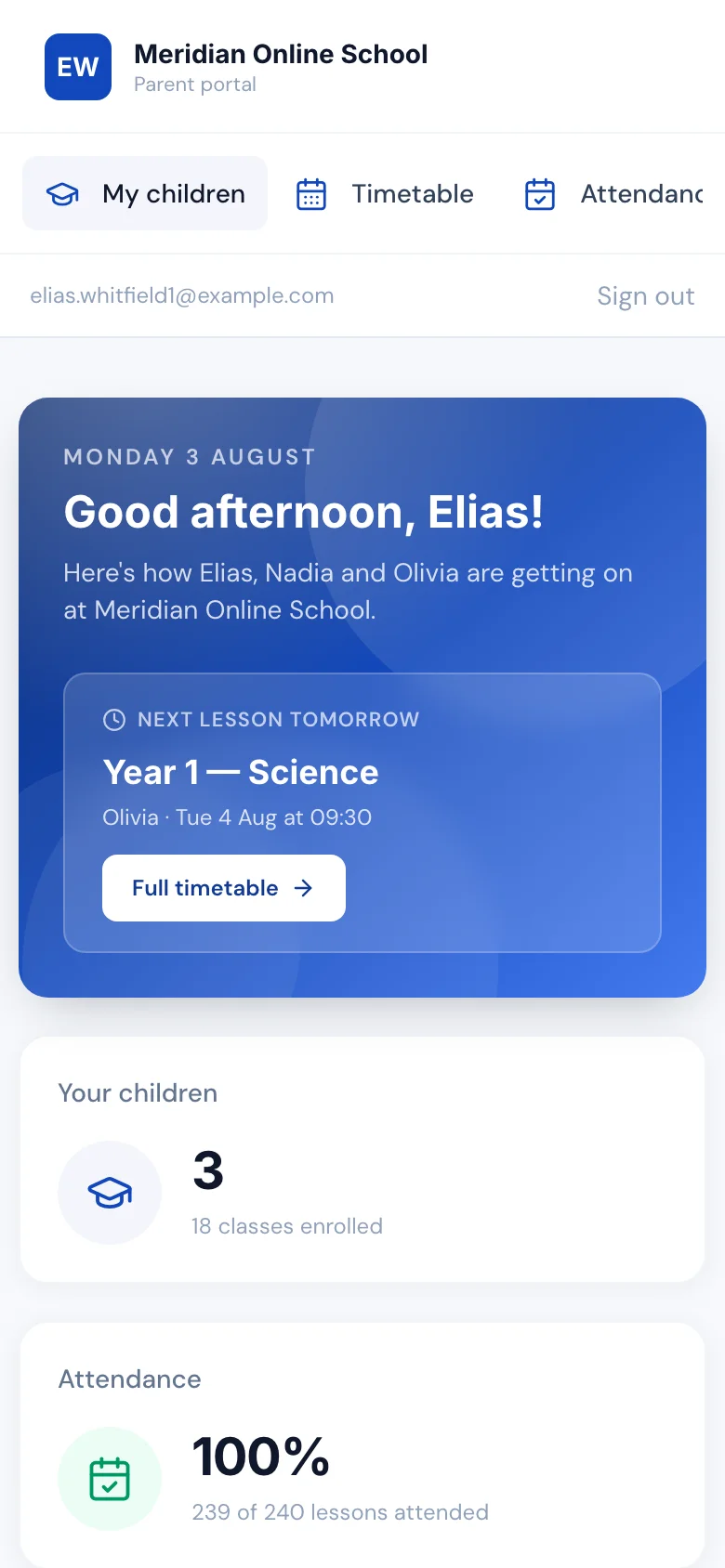
All of their children, on the phone in their pocket
A parent signs in once and sees every one of their children — not one account per child, and nothing to install. It opens in the phone’s browser, so it works on whatever they already have, and looks like this on the school run rather than only on a laptop at home.
On that one screen: today’s lessons with the join button, the timetable, attendance for each child, homework and the teacher’s marking, invoices and payment history, messages to the office, and their parents’ meeting slots. Joining a lesson is one button — not a hunt through a chat thread for the right link.
If they add it to their home screen — two taps, no app store — it gains your school’s icon and, when they allow it, notifications. Then the news reaches them instead of waiting to be collected: their child missed this morning’s lesson, a card payment failed, the parents’ meeting is tomorrow. Email is where school news goes to be read next week; a lock screen is where it gets read today.
Pupils have their own separate sign-in, deliberately: a child sees their own day, their homework and their lesson recordings, and nothing about fees or their siblings. Two audiences, two views, one system behind both.
Most of what parents ring your office about is already on that screen — which is exactly why the office stops being rung.
- One parent sign-in covers every child they have at the school
- Opens in the phone’s browser — nothing to download or update
- Add to the home screen for your school’s icon and notifications
- Absences, failed payments and meeting reminders reach the lock screen
- Fees, attendance, homework and messages in the same place
- Pupils get their own view: their day and their work, not the money
The office speaks every parent’s language
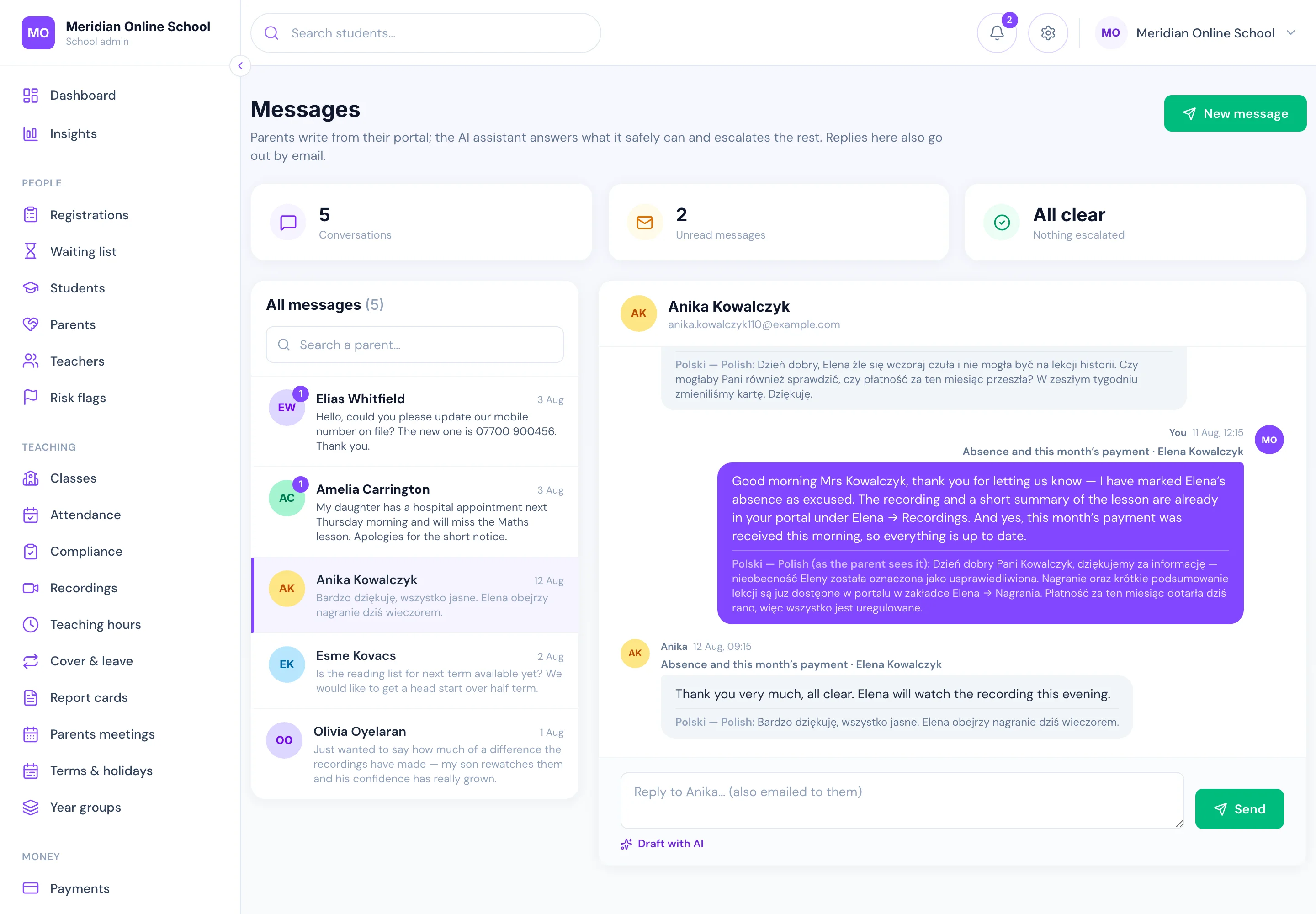
Online schools enrol families the local school never could: the parent who writes in Polish, the grandmother in Karachi doing pick-up duty by WhatsApp, the father whose English is fine for a chat but not for a fee dispute. Today that means messages pasted into a translator in another tab, nuance lost in both directions.
Here a parent picks their language once — twelve to choose from — and writes to the school in it. The office reads the message in English, replies in English, and the parent receives that reply in their own language. Both versions of every message are kept, so nothing ever exists in a language one side cannot read, and nothing is lost when staff change.
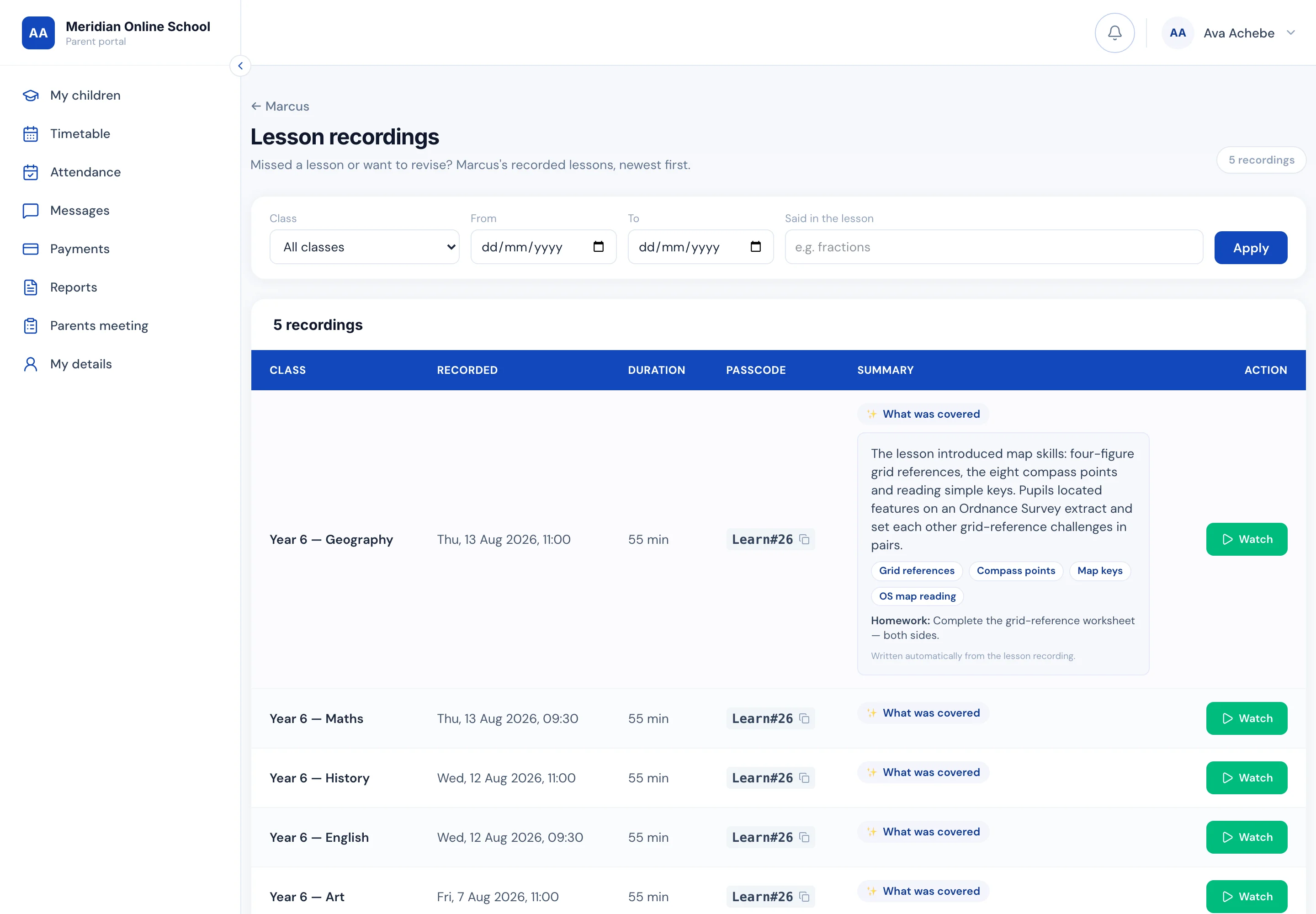
Lessons get the same treatment. Every recording is transcribed and summarised automatically — what was covered, the topics, and any homework set — on the recordings page parents and pupils already use. The whole archive is searchable by what was said in the lesson: type “fractions” and the right recording surfaces. And when a child misses a lesson, the next morning’s absence email carries the summary of exactly what they missed.
The same layer quietly works for the office: a draft reply in the inbox built from the family’s real records, the morning’s messages triaged urgent-first, and a Monday brief that names the week’s priorities. All of it is metered against a monthly cap you set — and none of it acts alone on a child’s record, money, or a safeguarding matter. It drafts; your staff decide.
- Parents write in their own language; the office reads and replies in English
- Twelve languages, chosen by the parent — both versions always kept
- Every recording summarised: what was covered, topics, homework set
- Search recordings by what was said in the lesson
- A missed lesson’s summary arrives inside the absence email
- Every AI feature metered, under a monthly cap you control
Notifications that land on parents’ phones — like an app, without the app
Schools send email because it is what they have — and a message about a child goes unopened beside a supermarket offer.
Your school behaves like an app instead. Two taps adds it to the home screen — no App Store, nothing to download — and it takes your icon and name, opening full screen. Then it pushes like one: the lesson missed or arrived late to, the payment that failed, the meeting in ten minutes. The absence lands within minutes of the lesson, not in tomorrow’s email. Tapping opens the right page, already signed in.
Only the things a school would ring about. Nobody is opted in without asking, nothing markety is ever sent, and it is not just for parents — teachers get cover requests and head teachers get risk alerts, on the day rather than in a Monday summary.
- Real push notifications, the same ones a native app sends
- Your school’s icon and name on the home screen, opening full screen
- Two taps to add — no App Store, no Play Store, nothing to update
- Absences and lateness within minutes of the lesson, not the next morning
- Payment problems, meeting reminders and cover alerts
- Each person chooses; account and password emails never appear here
- Tapping a notification opens the right page, already signed in
9:41
Tuesday 8 September
- Meridian Online Schoolnow
Olivia missed English at 10:00
- Meridian Online School2h ago
Payment problem — your monthly fee
- Meridian Online School9:50
⏰ Starting soon: Olivia × Mr Ellison
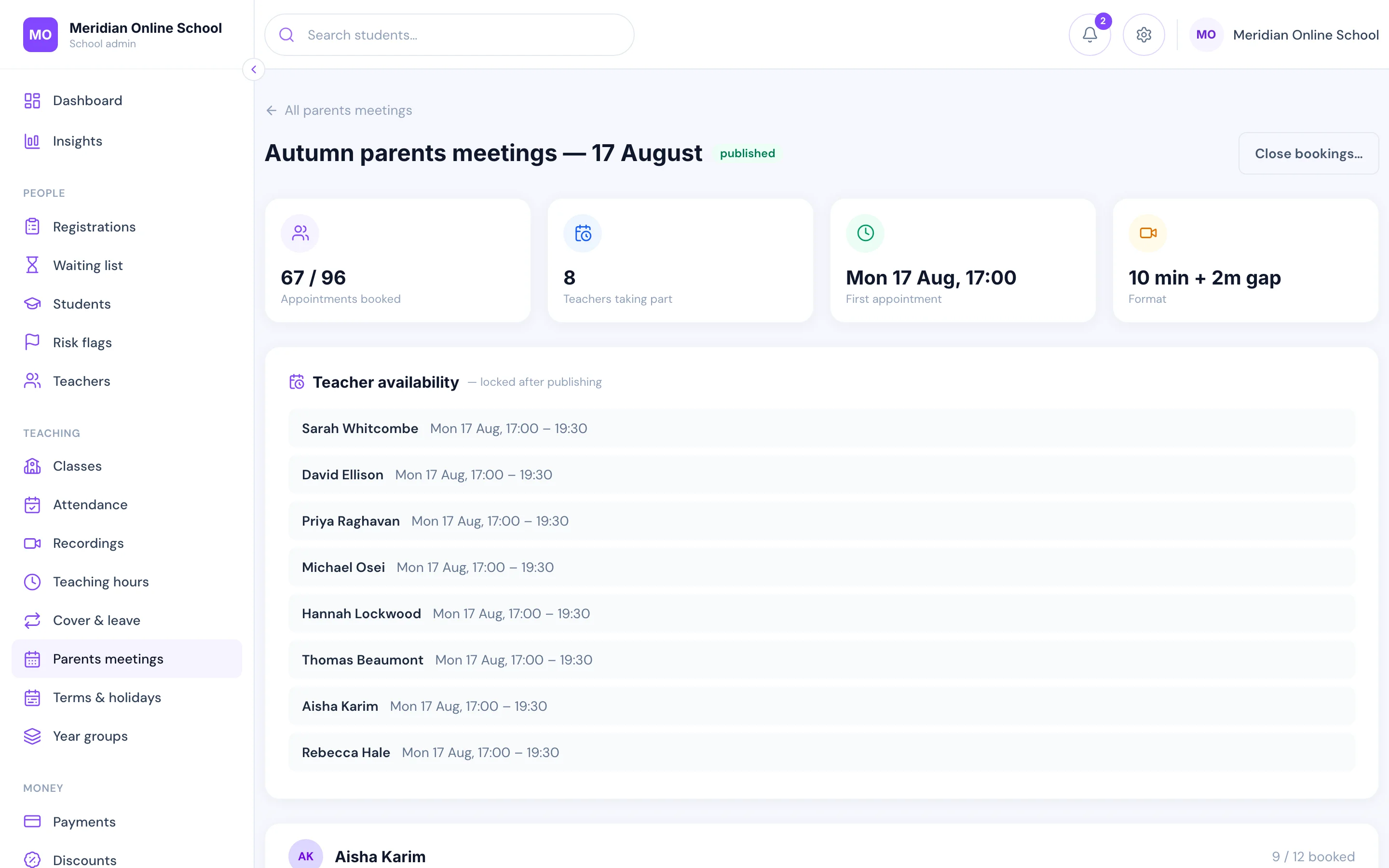
The parents meeting books itself
You open a window; parents book their own slots against each teacher; reminders go out; the meeting rooms are created for you.
The event that used to eat two days of admin per term now takes an afternoon to set up and runs itself.
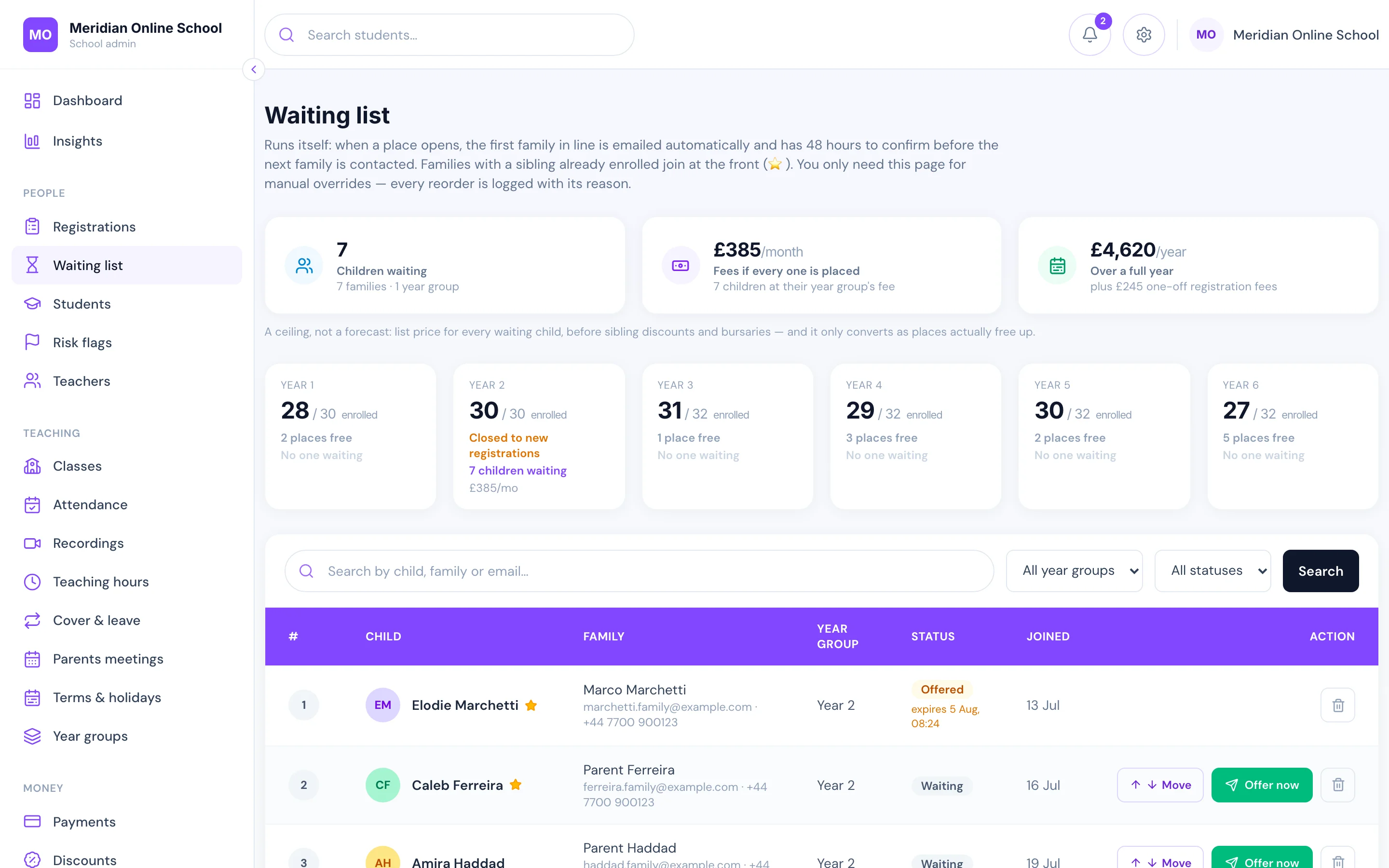
Your website and your waiting list, on the same system
The public site — pages, fees, FAQs — is edited by your office, not an agency. Enquiries and applications land in the same database as everything else.
When a year group fills, the waiting list takes over: sibling priority, timed offers, and a place released to the next family automatically if an offer lapses.
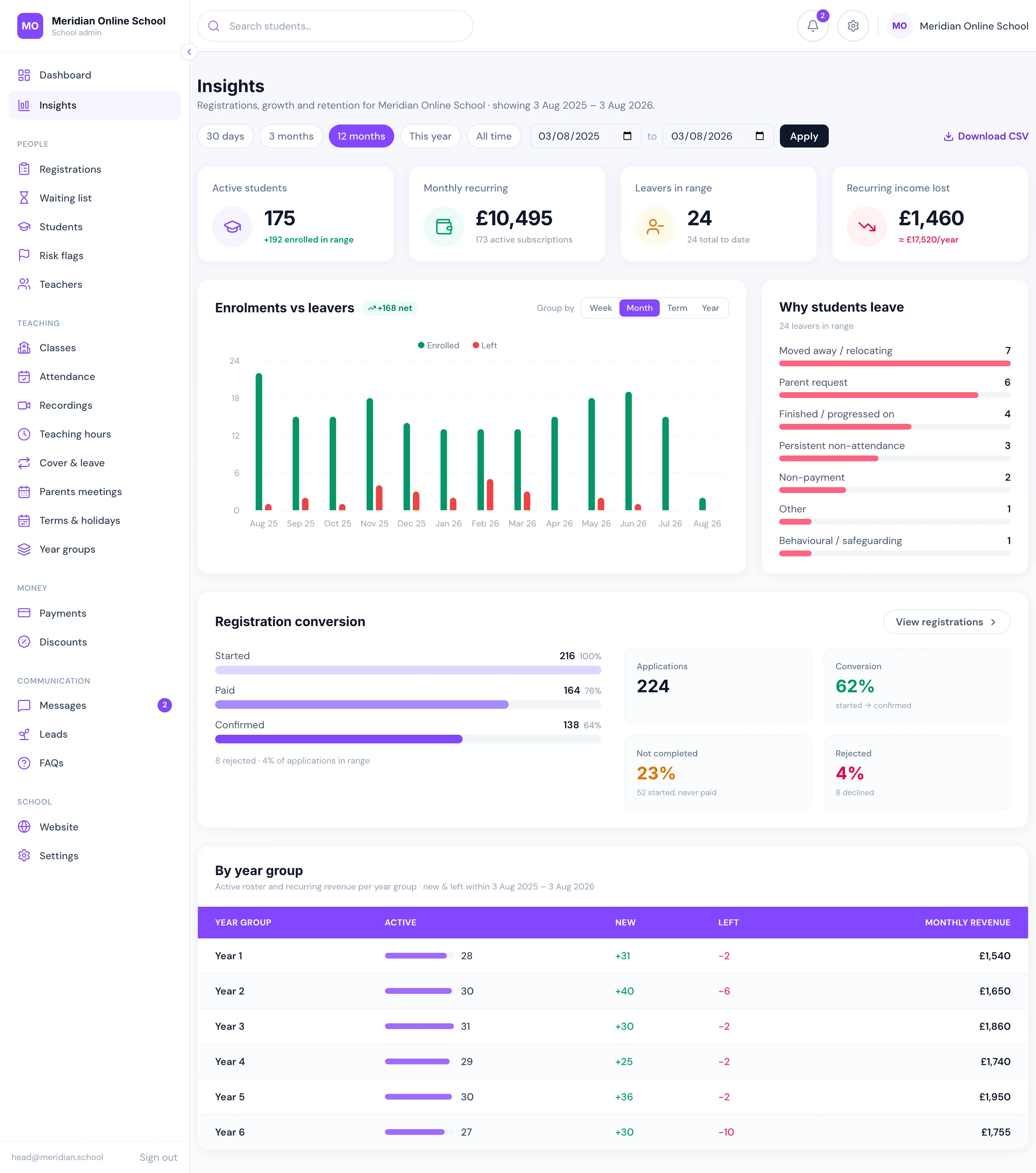
The numbers most schools only learn at the end of the year
Growth against departures, month by month. Why families actually left, grouped and counted. How many enquiries turned into pupils — and how many stalled halfway through the form. Roster and revenue for every year group.
One screen, no spreadsheet, and exportable the moment a trustee asks.
And the rest of it
Homework set, submitted and marked in-platform
Lesson recordings released to the right class
Teacher portal with today’s classes and registers
Pupil portal with timetable and homework
Teaching-hours and teacher-cover reporting for the pay run
Messages between office, teachers and parents
Term dates, timetables and automatic session creation
Deregistration reasons captured and analysed
Roles and permissions for eight kinds of staff
Absence emails to parents, on your rules
Full data export whenever you ask for it
Works with the website you already have
The question every school asks first: do we have to rebuild our website? No. Pick whichever of these fits — you can change your mind later.
We become your website too
Your public pages, fees, FAQs and admissions funnel run on LiveClass at your own domain. Your office edits them without ringing an agency, and an enquiry becomes an enrolment without ever leaving the system.
Best if your current site is dated, expensive to change, or already a chore.
You keep your website exactly as it is
LiveClass lives on a subdomain of your own domain — portal.yourschool.com carrying your name, colours and logo. You add two buttons to your existing site: Parent login and Apply for a place.
Setup is one DNS record and two links. Nothing about your site is redesigned, moved or touched.
Built for live online teaching, not adapted to it
The large school platforms are good at what they were built for: content, courses and gradebooks for schools with corridors. None of that addresses cover, payment-linked access, or knowing whether a nine-year-old was actually in this morning’s lesson.
| Capability | LiveClass | A typical school platform |
|---|---|---|
| Live lessons & attendance | ||
| One meeting per class, created for you — not one link for the whole school | Usually a link you paste in yourself | |
| Attendance captured from the lesson itself, with no teacher input | Teacher-marked register | |
| Minutes actually attended per pupil, not just present or absent | A tick, at best | |
| A personal join link per pupil, so siblings are counted separately | Not offered | |
| Join window enforced — the button opens just before and closes after the start | Not offered | |
| Fees & access | ||
| Monthly invoices raised and cards charged automatically | Usually manual invoicing, or a separate billing tool | |
| Overdue chasing that escalates on its own and stops the moment they pay | One reminder at best; the chasing is someone’s job | |
| Class access follows the fee: blocked when overdue, restored on payment | Fees and access are unrelated systems | |
| A head teacher override that unlocks any child, with the reason recorded | Not offered | |
| Sibling, staff and scholarship discounts as rules, overridable per family | Manual invoice edits | |
| Teachers & payroll | ||
| Teacher attendance and punctuality from the meeting, feeding the pay run | Self-reported, if recorded at all | |
| Teacher cover wired to the timetable — eligibility, first-to-accept, host reassigned | HR module, not connected to classes | |
| Teacher lateness detected from the lesson, not self-reported | Not offered | |
| Camera-off escalation for teachers, flagged to a head of department | Not offered | |
| Teacher cover leaderboard and an incentive threshold you set | Not offered | |
| Teaching hours exported straight into Xero or QuickBooks | Re-keyed into the accounts by hand | |
| Pupils & pastoral | ||
| Daily pastoral list: the pupils to look at today, and why | Analytics you have to go and read | |
| Risk scoring across attendance, payments, homework and messages together | Single-signal reports | |
| Reports, recordings & AI | ||
| Termly report cards marked in a grid, with AI-drafted comments a teacher approves | Spreadsheets and a mail merge | |
| Published reports land in the parent portal, snapshot forever | PDFs emailed one family at a time | |
| A missed assessment reweights the rest — never a zero for a paper never sat | Whatever the spreadsheet formula does | |
| Every lesson recording summarised: what was covered, topics, homework | A raw video link, if that | |
| Recordings searchable by what was said in the lesson | Not offered | |
| Parents message in their own language; the office reads and replies in English | Copy-paste into a translator | |
| AI usage metered per school, under a monthly cap you set | Not offered | |
| Parents & admissions | ||
| Waiting list with sibling priority and timed offers | A separate form | |
| Parents meetings booked end to end, with a private room per appointment | A booking add-on, if any | |
| Your public website and admissions funnel in the same system | A separate website you also pay for | |
| An AI assistant answering parents on your site and in the portal | Internal analytics assistant, if any | |
| Absence, lateness and failed payments pushed to a parent’s lock screen minutes after the lesson | Email only, and only if they open it | |
| Your school’s own icon on a parent’s home screen — no app store, no app to maintain | A native app you pay to build, or nothing | |
| Roles & security | ||
| Revenue and pricing visible to the owner alone; pay and policy to the head teacher | One admin role that sees everything | |
| Two-factor authentication for staff, and a head teacher can make it compulsory | Password only |
Comparisons describe the general category of school management platforms rather than any named product; individual vendors vary and their features change. We will happily go through a specific competitor with you on the call.
What it is actually worth
From a scoping exercise with one 300-pupil online school. Your numbers will differ — we work them out with you on the call, using yours.
£5,600–9,200
a year in subscriptions replaced
Homework app, noticeboard app, form tool, website builder and mailing tool — all native here.
~77–115 hrs
of admin work per week returned
Registration relay, payment chasing, attendance reconstruction, cover maths, repeated parent questions.
30% → 20%
churn is a realistic target
Most families who leave cite communication and organisation, not teaching. Both are fixable.
The point is not the savings. It is that the work stops growing with the school — so the team you have can run the school you want.
Where your children’s records actually live
You are handing over pupils’ names, dates of birth, attendance, safeguarding notes and their families’ payment details. Here is exactly what happens to them — the answers your data-protection review will ask for, before you have to ask.
On our own servers, in Germany
Inside the EU, on hardware we run — not an account with a US cloud provider, and not spread across a homework app, a noticeboard app and a form tool that each keep their own copy of your pupils.
One school can never see another
Every record is keyed to your school, and each request is resolved from your own address before a single row is read. Your teachers see your school; there is no shared view.
Credentials encrypted, passwords hashed
Your Zoom keys are encrypted at rest with AES-256-GCM and decrypted only in memory, on the server, at the moment they are used. Passwords are bcrypt-hashed — nobody here can read one, including us.
Backed up every night
A full database backup runs nightly and is kept on a rolling window, so a mistake on Tuesday is not permanent on Wednesday.
Pupils’ posts wait for a teacher
Anything a child posts to a class board is held until a teacher approves it. Pupils see their own day, their own work and their own recordings — never fees, never another family.
Safeguarding concerns are recorded, not just felt
A serious attendance concern can require the parent to acknowledge it, and every flag keeps who raised it, who resolved it and what was written — the trail an inspector asks for.
A lesson link belongs to one child
Join links are per pupil and enforced on our side, so a link passed to a friend, or yesterday’s link, simply does not open the room.
Two-factor authentication for your staff
Any staff account can add a second step from a normal authenticator app, and a head teacher can require it for everyone at the school. When a teacher changes phone, your own office clears it and they set it up again — no ticket, no waiting.
The paperwork your governors will ask for
A written data processing agreement, a privacy policy and terms are published and ready to hand to a governing body or a DPO — naming what we hold, who processes it and how long it is kept. Most of what you would compare us against cannot produce that on request.
The data is yours, including on the way out
You own everything in the system. Ask and we hand you a full export in an open format — no exit fee, no hostage-taking, no "contact your account manager".
One deliberate trade-off, stated plainly: a photo or PDF a pupil hands in is stored at a long, unguessable web address rather than behind a second sign-in, so it opens instantly for the teacher marking it. Anyone given that exact address could open it, which is why genuinely sensitive documents — a doctor’s note, for instance — are held outside the web root entirely and released only to signed-in staff. If your policy needs pupils’ work treated the same way, say so on the call: it is a setting we will add, not a rewrite.
Questions schools ask us
Do we have to move everything at once?+
No. Most schools start with enrolment, fees and attendance — the parts that hurt most — and add homework, parents meetings and the public site later. We migrate your existing pupils, families and fee arrangements for you as part of setting up.
How long does it take to go live?+
Weeks, not months. The platform already exists; onboarding is configuration, data migration and training rather than a build. The honest constraint is usually your own calendar — most schools prefer to switch at a term boundary.
What happens to the fees we already collect?+
You keep your own payment account and you keep 100% of your fees — we never sit between you and your parents’ money. Card fees go to the payment provider exactly as they do today.
Do we need to change our video platform?+
For online schools, lessons run on Zoom, and the automatic attendance depends on it. You bring your own Zoom account, which means your recordings and your meeting policies stay yours.
What if our lessons are in person, not online?+
Then you run LiveClass in in-person mode. Instead of attendance coming from Zoom, the teacher takes a register on a tablet — mark all present, then fix the exceptions in a few taps — and the office can mark a class too. Everything else is the same: enrolment, fees, homework, reports, messaging and the parent portal do not care whether the lesson was on Zoom or in a room.
Is our pupils’ data safe, and where does it live?+
On our own servers in Germany, inside the EU. Each school’s data is isolated, integration credentials are encrypted at rest, and the school owns its data throughout. If you ever leave, you get a full export. We publish a data processing agreement, a privacy policy and terms, so your governing body or DPO has the paperwork without having to ask for it.
Do parents have to install an app to get notifications?+
There is no app store and nothing to download. Parents can use it straight from the browser, and everything works — but notifications need two extra taps: add the site to the home screen, then allow notifications when asked. On an iPhone that home-screen step is required before notifications can arrive at all. Once done, your school has its own icon on their phone, and absences, failed payments and meeting reminders reach them the same day rather than sitting in an inbox. It stays each parent’s choice; nobody is opted in for them.
Can it handle how our school actually works?+
Most of what schools ask for is configuration rather than code: fee structures, discount tiers, gender-separated classes, attendance thresholds, who can see what. Where something genuinely is not supported, we will tell you before you sign rather than after.
What does it cost?+
One monthly fee for the whole school, with nothing per parent, per teacher or per login. We do not publish a price list, because the right figure depends on your school: how many pupils you have, how you teach and what you need from the platform. Book a demo, see it working, and we will give you an exact quote for your school. There is also a one-off setup fee for migration and training, quoted once we know how much is moving. Quotes exclude VAT. For context, a school of about 175 pupils is typically paying £260–370 a month in subscriptions before anybody’s hours are counted.
Who is behind it?+
Ummah Design, a UK web and software studio. LiveClass grew out of building this system for a real online school with several hundred pupils — every feature here exists because a school needed it on a specific Tuesday, not because it looked good on a roadmap.
See it running a real school
A live walkthrough of the platform with a real school’s data in it — enrolment, fees, attendance, the parent portal — and time for whatever you want to poke at. About 30 minutes.
- No slide deck — the actual product
- Pricing answered properly, with your numbers
- If it is not a fit, we will tell you